

VCF 9 can rotate all your administrative passwords automatically if you do it first and foremost within the first 90 days after the initial deployment and afterwards if you remember yourself to do it regularly or if you get remembered by VCF. The latter only works for the infrastructure components at the moment (vCenter, ESX, NSX). Unfortunately, the notification for password expiration of the VCF management components (VCF Ops, Ops for Logs, Ops for Networks, VCF Automation, external IDB, external Orchestrator) is not (yet) displayed in the Fleet UI.
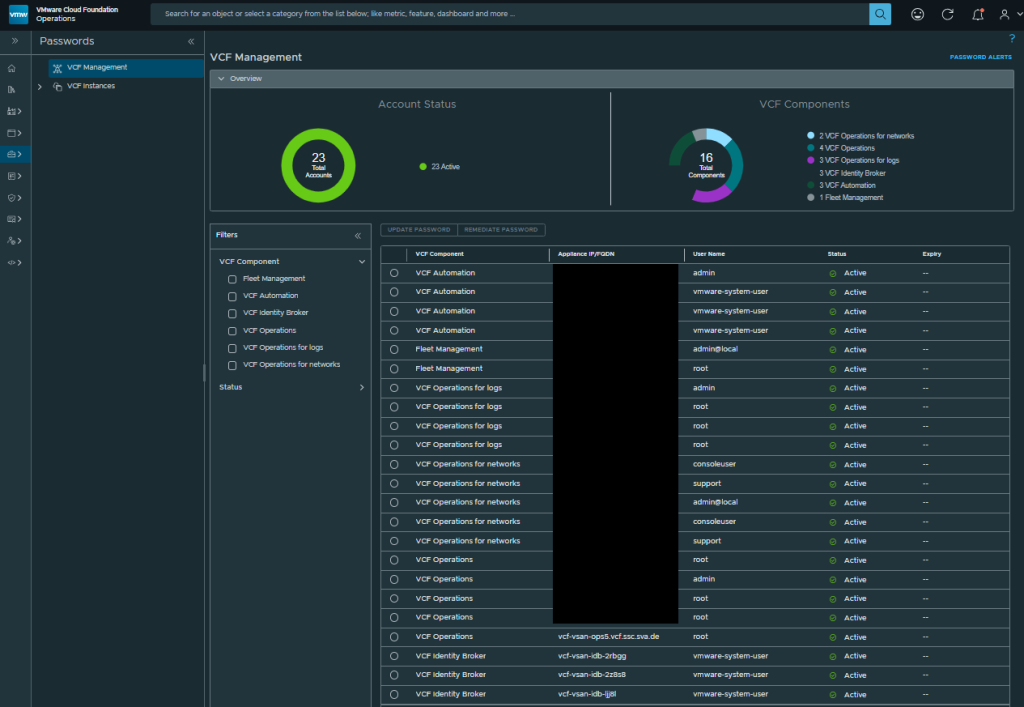
Since earlier VCF verions our recommendation has mostly been to disable the password expiration (set to 9999 days) in SDDC Manager, vCenters & SSO, NSX Managers, and NSX Edges and to rotate them regularly. Now you should do the same for ALL of the above additional appliances! Restoring expired passwords is no fun! We ran into some issues with VCF 9.0 and 9.0.1 in our Demo lab environment and our first Customer PoCs, which could have been avoided if we changed passwords in time or set the password expiration accordingly.
Hereby, I want to share some helpful Links and KBs:
Managing Passwords for VMware Cloud Foundation Components
https://techdocs.broadcom.com/us/en/vmware-cis/vcf/vcf-9-0-and-later/9-0/fleet-management/manage-passwords.html
Resetting the root password on a Photon appliance in VMware Aria Automation 8.x
https://knowledge.broadcom.com/external/article/325916
also works in VCF9
How to reset and unlock the local admin account in Aria Operations for Logs (Formerly vRealize Log Insight)
https://knowledge.broadcom.com/external/article/339878/how-to-reset-and-unlock-the-local-admin.html
also works in VCF9
Unable to remediate VCF Automation “vmware-system-user” password once expired.
https://knowledge.broadcom.com/external/article/419010/unable-to-remediate-vcf-automation-vmwar.html
I hope this post can be helpful to you. Feel free to share if you like…
// footnotes:
Date: 19. Dec 2025
Version: 1.0